Locus Map Settings

Map Theme

Map theme defines the visual style and can be used to customize the map.

  • Select the Map-screen content icon.

    • Select the Map theme icon.
    • Select the CA Trail Map theme.
    • The CA Trail Map HD theme displays objects at higher levels.
    • Optionally, change the map background.
    • Transparent is used to display the map on top of other maps or imagery.
    • Topo HD option displays topo lines at higher levels.

Map Overlay

Map overlay feature is used to display the trail map on top of the topo background or satellite imagery.

  • California Trail Map on topo background.

    • Select the Base map of your choice: CA Topo Background or any other map.
    • Select Map overlays.
    • Enable Overlay
    • Select California Trail Map as the overlay.
    • Navigate to Map Themes.
    • Select Topo or transparent if overlaying on satellite imagery.
  • California Trail Map on satellite imagery.

Map Shading

Map Shading can be added to any map. Map shading features can impact performance. Elevation data must be installed.

  • Land Boundary background with map shading.

    • Download Elevation Data from website or app.
    • Select Map Shading from Map Content screen.
    • Enable Map Shading.
    • Select settings of your choice.

Cursor Elevation Indicator

Elevation will be displayed adjacent to the location cursor.

  • Cursor Elevation

    • Download Elevation Data from website or app.
    • Navigate to Settings \ Maps \ Auxilary Graphics
    • Enable Dynamic Elevation.

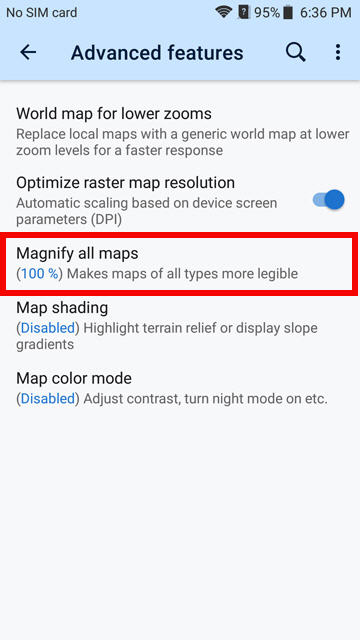
Magnify Maps

Phones tend to compress the map layout. Magnify Maps can be increased to make it easier to view.

    • Navigate to Settings \ Maps \ Advanced Features
    • Select Magnify All Maps

Text Size

Increasing the map resolution can increase the text size too much. Text Size can be adjusted to compensate.

    • Navigate to Settings \ Maps \ Offline Maps
    • Select Text Size.

Online Map Providers

Locus online map providers are updated when the vector map is installed.
This script can be used to update the map providers list.


Update Map Providers


Link will only work when clicked on an Android device with Locus Map installed!


Like Us On Facebook